
- Many SMEs do not need a full ERP replacement, they need cleaner data flows and fewer manual handoffs
- Better integration is often the right first move when the current ERP still handles core processes well
- A new ERP makes sense when the existing system blocks growth, access to data, security, or day-to-day work
- The decision should come from process mapping, cost comparison, and a controlled pilot
The choice between a new ERP or better integration often appears when daily work starts to feel harder than it should. Orders are entered twice, stock levels do not match, reports take hours, and staff rely on spreadsheets to bridge gaps. My view is clear: most small and mid-sized businesses should not replace their ERP first. They should first find where data stops flowing. A full replacement is justified only when the current system has become a real limit, not just an easy target for wider process problems.

Start with the business problem, not the software
ERP projects often begin with a list of missing features. That is understandable, but it is also risky. A missing dashboard may not mean the ERP is weak. The real issue may be poor data quality, unclear ownership, or information stored in several systems.
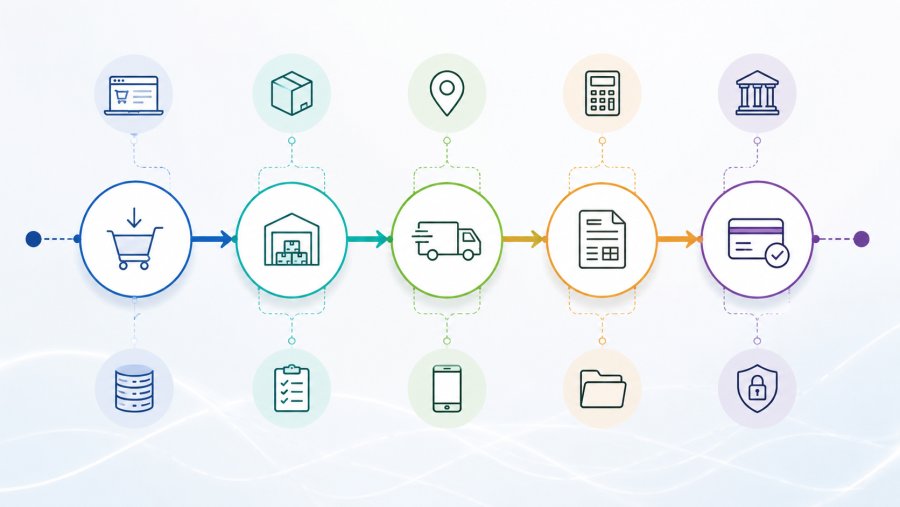
Take a common example. An online order reaches the sales team by email. Someone copies it into the ERP. The warehouse checks stock in another tool. Finance then creates the invoice by hand. In this case, the ERP may still perform its own tasks well. The problem is the broken path between tools.
Before choosing a new ERP or better integration, map a few real workflows from start to finish. Use actual orders, invoices, returns, and purchase requests. Record who touches each step, which system they use, and where data gets copied or changed.
This exercise often changes the discussion. It separates software limits from process gaps. It also shows where one small change could remove hours of repeated work.
New ERP or better integration: diagnose the system first
The main question is not whether your ERP feels old. The main question is whether it still supports the core of your business. Age alone is a weak reason to replace it. A stable system can still be useful if it handles finance, stock, purchasing, and basic reporting with reliable data.
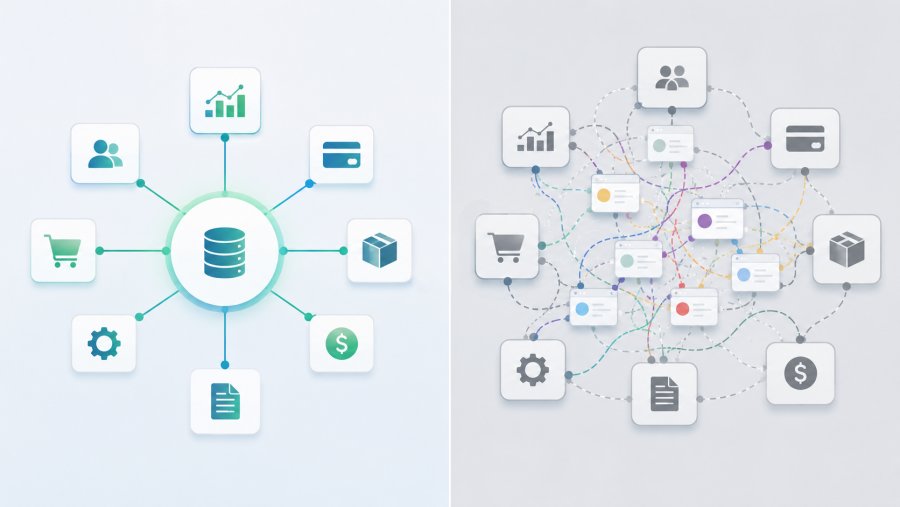
However, the ERP does not operate alone. Most SMEs also use a CRM, an ecommerce platform, banking tools, shipping portals, production software, and shared spreadsheets. The quality of the whole setup depends on how these tools exchange data.
An ERP can be sound while the wider system is inefficient. This happens when product codes differ between sales and warehouse systems. It also happens when customer records have no common format or when each department updates its own version of the truth.
Replacing the ERP in that situation may only move the mess into a newer platform. The same duplicates, unclear rules, and manual fixes will return. Therefore, the decision between a new ERP or better integration must include data governance and process ownership.
Ask a few direct questions. Can the ERP export complete data? Does it offer documented APIs? Can staff trace changes? Are key tasks handled inside the system, or through side processes? The answers reveal whether the problem sits at the edges or at the core.
When better integration is the smarter move
Integration is usually the better choice when the current ERP handles its main duties well. The pain is often limited to a few handoffs between systems. Orders, stock updates, shipping status, invoices, and customer records are common examples.
A well-designed integration removes repeated entry and reduces delay. It also gives teams faster access to the same information. For example, an ecommerce order can enter the ERP automatically. The ERP can then return stock and fulfilment updates without staff copying data between screens.
APIs often provide the cleanest route for this exchange. The OpenAPI Specification offers a standard way to describe API operations, inputs, and responses. Good documentation makes an integration easier to build, test, and maintain.
Still, integration is not the same as adding quick scripts. Each connection needs clear rules for errors, retries, logs, access rights, and ownership. Security also matters because APIs can expose sensitive business data. The OWASP API Security guidance is a useful reference for common risks.
If one or two stable links solve the main bottlenecks, the case for a new ERP or better integration becomes much clearer. Improve the existing setup first and measure the result.
When a new ERP becomes the right choice
Integration is not always the answer. Sometimes it only extends the life of a platform that no longer fits the business. A new ERP becomes reasonable when the limits are structural, repeated, and costly.
The first warning sign is poor support for essential processes. If every new customer type, warehouse, service model, or production step requires a workaround, the system is shaping the business in the wrong way. Staff then spend more time adapting to software than serving customers.
The second sign is weak access to data. An ERP that lacks complete exports, reliable APIs, or clear reporting creates dependence on the vendor. Every new need becomes a custom request. That slows decisions and raises long-term cost.
Security can also force the issue. Unsupported software, weak access control, and poor audit records create risks that an integration cannot fix. The ISO/IEC 27001 standard provides a recognised framework for managing information security risks.
Finally, growth may expose hard limits. More sites, more warehouses, international sales, subscriptions, or complex production can push an old ERP beyond its design. In that case, choosing a new ERP or better integration is no longer a balanced choice. The core platform needs to change.
Even then, migration should not start with software selection. It should start with clean requirements, data ownership, and a plan for what will not move into the new system.
Compare the real cost, not just the quote
Businesses often compare licence fees and project prices. Those numbers matter, but they do not show the full cost. A replacement also includes data cleaning, staff training, testing, process redesign, temporary slowdown, and internal management time.
Integration has hidden costs too. Connectors need monitoring, updates, support, and documentation. A change in an API, field name, tax rule, or login method can require technical work. Therefore, the cheapest initial option may not be the cheapest over several years.
The cost of doing nothing also belongs in the comparison. Manual entry, shipping errors, delayed invoices, weak stock data, and slow reports all consume time. They may not appear as one clear expense, but they reduce capacity and trust.
A useful business case compares three paths:
- Keep the current setup and accept the present limits
- Integrate the systems that cause the most manual work
- Replace the ERP and redesign the wider process
For each path, estimate cash cost, staff time, risk, disruption, and expected benefit. This makes the new ERP or better integration decision less emotional and more practical.
Use a practical decision process
An SME does not need months of analysis to make progress. It needs enough evidence to avoid a costly guess. A short, focused review can show which direction deserves more work.
- List the five process problems that cause the most delay, error, or manual effort
- Link each problem to a workflow, a system, and a responsible owner
- Check whether the ERP already supports the needed task and whether staff use it correctly
- Review available APIs, exports, standard connectors, and vendor support
- Estimate cost, risk, and internal effort for keeping, integrating, and replacing
- Test one critical workflow before making a wider commitment
Data protection must also be part of the review. Integrations and migrations can move personal data across more systems and suppliers. The European Commission offers official GDPR guidance for organisations on business duties and data protection rules.
A pilot is especially valuable. If one integration removes a major manual step and stays reliable, you have evidence for a wider integration plan. If the pilot fails because the ERP cannot provide clean data or stable access, you have evidence for replacement.
My view: integrate first, replace when the core is broken
For many SMEs, better integration should come before a full ERP replacement. It is faster to test, easier to contain, and often less disruptive. More importantly, it forces the business to understand its own data and workflows.
That work is never wasted. If integration solves the main issues, the company keeps a stable core and gains smoother operations. If it exposes deep platform limits, the business enters an ERP project with clearer requirements and cleaner data.
A replacement is the right move when the ERP blocks essential processes, weakens security, limits data access, or cannot support growth. At that point, more connections only add complexity around a failing centre.
So, when you weigh a new ERP or better integration, do not start with vendor claims. Follow one real order from sale to payment. Count every manual handoff, delay, correction, and missing field. The point where the flow breaks will tell you more than any polished demo.
The best choice is the one that reduces complexity and gives the business more control. Sometimes that means a new platform. Often it means making the systems you already own work together properly.