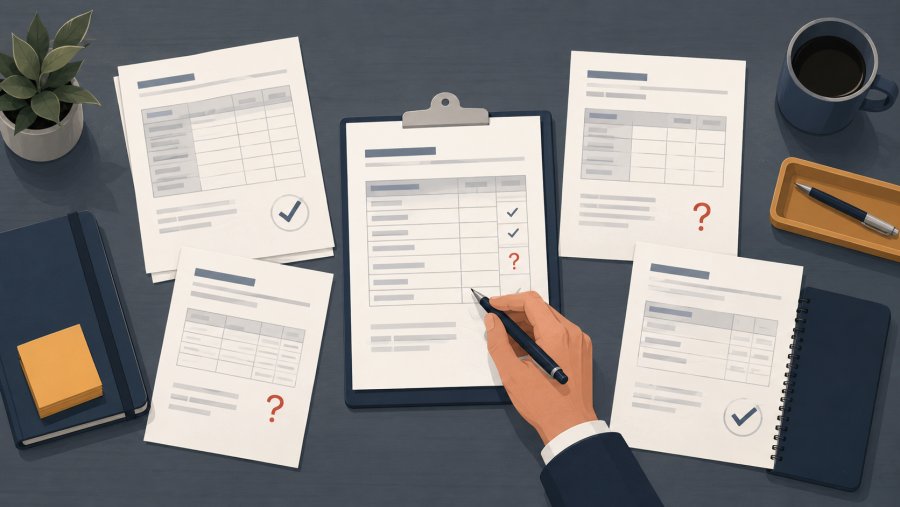
- The first mistake in Invoice Reconciliation is starting with automation before mapping the real process
- Small invoice errors often come from mismatched IDs, partial deliveries, manual notes, and unclear ownership
- A clean reconciliation workflow needs a shared source of truth before any rule or integration can work well
- The best results come from fixing the process first, then automating the repeated checks
Invoice Reconciliation looks simple from the outside: match invoices with orders, delivery notes, payments, and accounting records. In practice, many small and medium businesses discover the same problem too late. They try to automate a messy process before they understand where the mess starts.
This case study tells the story of a small B2B distributor that reached that point. The company sold technical spare parts through a mix of phone orders, email requests, and a WooCommerce store. The team wanted faster month-end closing, fewer supplier disputes, and less time spent checking invoice lines by hand.
Their first mistake was not choosing the wrong tool. It was assuming that the invoice was the starting point. It was not. The real starting point was the chain of events before the invoice existed.
Invoice Reconciliation started as a month-end headache
The company had around 35 employees and a lean admin team. Sales came from three channels: direct account managers, repeat email orders, and online orders through WooCommerce. The accounting team used one system, the warehouse used another, and sales often kept context in inboxes.
At first, the problem looked small. A few supplier invoices did not match purchase orders. Some customer invoices had the wrong shipping charge. A handful of online orders appeared paid in WooCommerce, but still needed manual checks before posting to the accounts system.
Then the volume grew. By the end of each month, the admin team faced a long queue of invoices that needed review. Some matched at header level but failed at line level. Some had the right total but the wrong VAT treatment. Others showed different product codes because suppliers used their own references.
The finance manager described the work in plain terms: “We spend too much time proving what should already be clear.”
At that point, the team wanted an automation project. They asked for a workflow that could match invoices against orders and flag only the exceptions. That was a fair goal. However, the first review showed that the process had deeper issues.
The first mistake: treating the invoice as the only source of truth
The company began by collecting invoice PDFs. That sounded logical because the pain appeared when invoices arrived. However, Invoice Reconciliation is not just a document check. It is a data comparison across events.
An invoice says what someone claims happened. It does not prove what was ordered, shipped, received, credited, or paid. Therefore, the team needed to compare the invoice with several records:
- The purchase order or sales order
- The goods receipt or delivery note
- The customer payment or supplier payment status
- The product master data
- The tax and accounting rules applied in the accounts system
The first mistake was building the workflow around the final document. This forced the team to repair missing context after the fact. For example, when an invoice line showed a product code that did not exist in the accounting system, the admin team had to ask sales or warehouse staff what had happened.
Because the team treated the invoice as the truth, they also created too many false exceptions. A price difference could be a real error. It could also be a valid discount agreed by email. A quantity difference could be a missing delivery. It could also be a partial shipment that the warehouse had not posted yet.
In other words, the team did not have a reconciliation problem only. It had a source-of-truth problem.
How the team mapped the real process
Before any automation rules were built, the team mapped one full invoice journey. They started with a single supplier invoice and followed it backwards. That simple exercise changed the project.
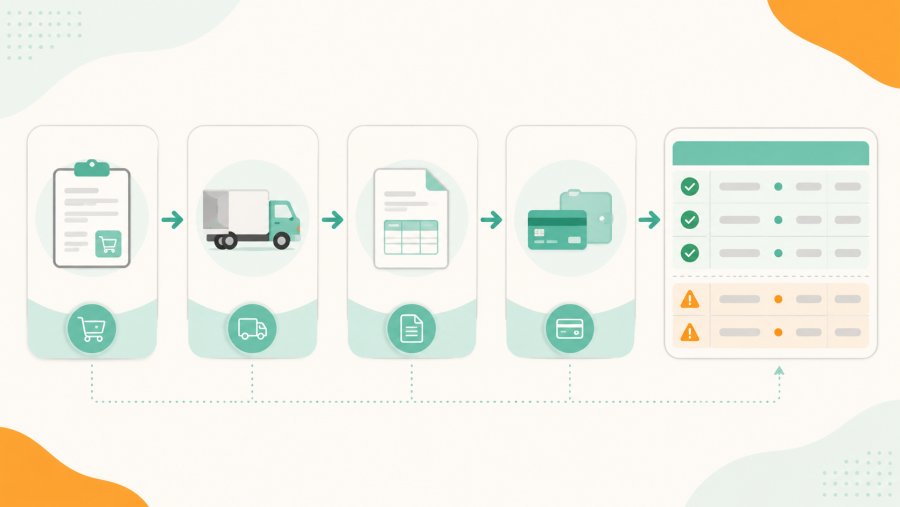
The team found that one invoice touched five places before approval. The order was raised in the purchasing process. The goods were received in the warehouse system. A delivery note was saved as a PDF. The invoice arrived by email. Finally, the accounting team typed or imported the invoice into the finance system.
Each step had small differences. Product names changed. Supplier codes did not always match internal SKUs. Shipping fees appeared as separate lines in some systems and as part of the total in others. VAT codes also needed care, especially when invoices included services, goods, and transport costs.
For e-commerce orders, WooCommerce added another layer. Order statuses, refunds, coupons, and shipping lines had to be read in the same way each time. The team used WooCommerce as an order source, so they reviewed the official WooCommerce order documentation to align internal terms with platform terms.
The mapping session produced one clear rule: no field could be automated until the team named its trusted source. This included order numbers, invoice numbers, SKU mapping, quantities, tax codes, and payment status.
The practical approach: fix the data path before the automation
The team then moved from symptoms to causes. They did not start with a large technical build. Instead, they cleaned the path that invoice data followed.
Step 1: define matching rules
First, they defined what a “match” meant. This was more useful than it sounded. Before the project, one person checked totals. Another checked quantities. Another focused on tax codes. Because of that, the same invoice could pass one check and fail another.
The team agreed on three match levels:
- Header match: supplier or customer, invoice number, order number, date, and total amount
- Line match: SKU, description, quantity, unit price, discount, tax rate, and line total
- Status match: delivery, receipt, refund, credit note, and payment status
This gave the automation a clear job. It did not need to “understand invoices” in a vague way. It needed to compare fields according to agreed rules.
Step 2: normalise product and supplier data
Next, the team created a basic mapping table. It linked supplier product codes to internal SKUs. It also mapped common name variations, pack sizes, and units of measure.
This step felt boring, but it removed many exceptions. A supplier could write “box 10 pcs” while the internal system stored “pack of 10”. Without a mapping rule, the invoice looked wrong. With a mapping rule, the check became simple.
The same logic applied to supplier names. One supplier appeared under three slightly different names across emails, orders, and invoices. The team cleaned that record and set naming rules for future entries.
Step 3: connect the systems that mattered
Only after the rules were clear did the team design the integration. The target was not a flashy dashboard. The target was a reliable exception list.
The workflow pulled order data, invoice data, delivery data, and payment status into one reconciliation table. It then applied the matching rules and returned three outcomes:
- Matched and ready to post
- Matched with warning
- Blocked for review
The project did not replace the finance team. It removed the repeated checks that did not need human judgement.
Where webhooks were needed, the team checked the official WooCommerce webhooks guide. For the accounting side, they followed the data export and import rules supported by the company’s own accounting system.
Concrete results after the first controlled rollout
The team did not launch the new workflow for every invoice at once. They started with one supplier group and one sales channel. That choice lowered risk and made errors easier to trace.
During the first four weeks, the team measured three things: invoices touched by hand, exceptions created, and time to close the supplier invoice queue. The figures below should be checked against internal records before publication
Manual checks fell because clean matches no longer needed a person to open the same files again. The exception list became shorter, but more useful. Instead of “something does not match”, each exception named the field that failed and the likely reason.
For example, one blocked invoice showed a quantity mismatch. The system found that the purchase order contained 120 units, the goods receipt showed 100 units, and the invoice charged 120 units. The admin team no longer had to search through emails. They could send the warehouse team a precise question.
Another warning showed a tax code difference on a shipping line. The total matched, but the accounting treatment needed review. This mattered because a total-only check would have missed it.
By the end of the controlled rollout, the finance manager had a shorter month-end list and better confidence in the remaining exceptions. The team also found process issues outside finance. Some came from warehouse timing. Others came from sales discounts saved in emails instead of the order record.
Why small businesses should not copy enterprise workflows blindly
Many large companies use formal three-way matching. They compare purchase order, goods receipt, and supplier invoice before payment. The concept is useful, and it has a clear entry on three-way matching.
However, small and medium businesses need a practical version. They often do not have perfect purchase orders for every case. They may handle urgent buys by email. They may use a mix of online orders, manual orders, and repeat supplier agreements.
That does not mean they should accept chaos. It means they should design Invoice Reconciliation around their real data flow. A simple two-way check may work for some low-risk invoices. A three-way check may be needed for stock purchases. A payment-status check may matter most for e-commerce orders.
The right model depends on risk. High-value supplier invoices need stricter checks. Small recurring charges may need only basic validation. Customer invoices linked to online orders may need fast status checks, especially when refunds or partial payments are common.
This is also where stock data matters. If the warehouse record is late or wrong, invoice checks suffer. A stock sync issue can become a finance issue when quantities do not agree across systems
The lessons learned from the first mistake
The main lesson was clear: do not automate a process you cannot explain. Invoice Reconciliation works best when the business defines the logic before the integration starts.
The second lesson was about ownership. Every key field needed an owner. The warehouse owned receipt quantity. Sales owned discount approval. Finance owned tax coding. E-commerce owned order status. Once ownership was clear, exceptions stopped bouncing between teams.
The third lesson was about tolerance. Not every difference should block an invoice. Some small rounding differences may be acceptable if company policy allows them. However, tax code differences, unknown suppliers, duplicate invoice numbers, and missing order IDs usually need review.
The team also learned to separate process errors from invoice errors. A supplier invoice may be correct, while the internal order is incomplete. If the automation only says “invoice failed”, the team may chase the wrong person. A good workflow should show the failed field and the record that caused the issue.
A simple checklist before you start Invoice Reconciliation
Before building any automation, use this checklist. It helps you avoid the same first mistake.
- List every system that creates or changes order, invoice, delivery, stock, and payment data
- Decide which system owns each field
- Define what counts as a full match, warning, and blocked exception
- Map supplier codes to internal SKUs before matching invoice lines
- Check whether discounts, refunds, shipping fees, and credit notes follow clear rules
- Start with one supplier group or one sales channel before scaling
- Measure manual touches, exception volume, and time to close
For Italian businesses, electronic invoicing rules may also affect how invoice data is received and stored. The official Agenzia delle Entrate page on fatturazione elettronica is the primary source to verify current requirements.
If supplier invoice handling is the main pain point, the process should also cover intake, approval, registration, and dispute tracking Reconciliation is stronger when invoice capture and invoice approval follow the same rules.
What changed in the business
The most important result was not only time saved. It was trust. The finance team could explain why each invoice passed or failed. The warehouse team could see when its own timing affected month-end work. Sales could see why informal discounts created admin work later.
That trust changed the tone of month-end. Before the project, people discussed invoices as isolated problems. After the rollout, they discussed data flow. That shift made future improvements easier.
The company also gained a better base for reporting. Once invoice status, order status, and delivery status sat in one workflow, the team could spot patterns. For example, one supplier caused repeated quantity mismatches. One sales channel created more missing references than expected.
Invoice Reconciliation from scratch does not begin with software. It begins with a shared answer to one question: which record do we trust for each part of the invoice?
Once that answer is clear, automation becomes safer and more useful. Without it, even the best tool only moves the same confusion from a spreadsheet into a faster system.
Frequently asked questions
What is Invoice Reconciliation?
Invoice Reconciliation is the process of checking invoice data against related records, such as orders, delivery notes, payments, and accounting entries. The goal is to confirm that the invoice is correct before posting, paying, or closing it.
What is the first mistake companies make with Invoice Reconciliation?
The first mistake is treating the invoice as the only source of truth. A good process checks the full chain of events behind the invoice, including order, delivery, receipt, tax, and payment status.
Can small businesses automate Invoice Reconciliation?
Yes, but they should define the process first. Automation works best when matching rules, field ownership, and exception types are clear before systems are connected.
Which invoices should be checked first?
Start with invoices that create the most manual work or the highest risk. This often means high-volume suppliers, stock-related purchases, or e-commerce orders with refunds, discounts, and shipping lines.
How do you know if Invoice Reconciliation is working?
Track manual touches, blocked exceptions, false exceptions, and time to close the invoice queue. A good workflow should reduce routine checks while making real exceptions easier to understand.