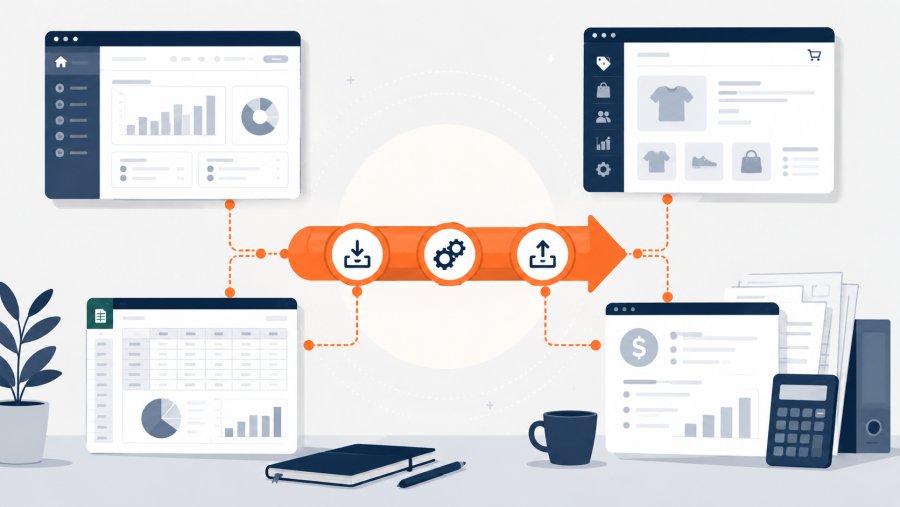
- ETL connects data that now lives in separate tools, files and databases
- A good ETL flow starts with process mapping, not with code
- Staging tables, validation rules and logs make data movement safer
- SMEs can start small by automating one high-value data flow first
Your Data Is Siloed. Here Is What ETL Does About It is not just a technical statement. It is a common problem inside many SMEs. Orders live in the e-commerce platform, invoices live in accounting software, stock sits in a management system and reports are rebuilt in Excel by hand.
ETL means Extract, Transform, Load. In plain terms, you take data from one or more sources, clean it, reshape it and load it into the right place. The goal is not to move data for its own sake. The goal is to make business work smoother, safer and easier to control.
This guide explains how to plan and build a practical ETL flow. It uses simple examples that fit real SME cases, such as orders, stock, customer records and supplier invoices. The aim is to give owners and managers a clear path before they invest time or budget.
Why siloed data becomes a business problem
SMEs rarely create data silos on purpose. They appear over time. First, the business adds a management system. Then it adds an online store. Later, it adds an accounting tool, a CRM, a warehouse file or a supplier portal.
Each tool solves one problem. However, each tool also creates its own data store. Soon, the same customer exists in three places. The same product code may have different formats. The same invoice may have different states across systems.
This creates daily friction. People copy and paste data. Teams compare reports manually. Managers ask which number is correct. Moreover, errors often appear late, when a shipment fails, a payment is missed or a report no longer matches.
ETL helps because it gives structure to that movement. It defines where data comes from, how it changes and where it goes. Therefore, the business can stop relying on manual fixes as the main integration method.
Your Data Is Siloed. Here Is What ETL Does About It in practice
Your Data Is Siloed. Here Is What ETL Does About It can be translated into three operational steps. First, extract data from the source systems. Then transform it into a common format. Finally, load it into the system that needs it.
The concept is well known in data engineering. A general overview is available in the Extract Transform Load entry. However, an SME does not need an enterprise data platform to start. It needs a clear, controlled flow for one business process.
Extract: get the data from the source
Extraction means reading data from existing tools. Common sources include CSV files, databases, APIs, spreadsheets and shared folders. Each source has strengths and limits.
A CSV export is easy to start with. However, a column name can change without warning. An API is more stable, but it needs credentials and error handling. A database query can be powerful, but it must not slow down the live system.
A basic order export may look like this:
order_id,customer_code,sku,quantity,total,date 1001,C001,SKU-RED-42,2,89.90,2026-06-01 1002,C014,SKU-BLU-39,1,49.90,2026-06-01 1003,C001,SKU-GRN-40,3,119.70,2026-06-02
If your team uses Python for small ETL scripts, the official Python csv module explains how to read and write CSV files in a controlled way.
Transform: make the data consistent
Transformation is where most value appears. You clean fields, align formats, map statuses, remove duplicates and check missing values. Without this step, you only move messy data from one place to another.
For example, one system may export dates as day, month and year. Another may use ISO format. People can understand both formats. Machines need clear rules.
from datetime import datetime def normalize_date(value): formats = ["%d/%m/%Y", "%Y-%m-%d"] for date_format in formats: try: return datetime.strptime(value, date_format).date().isoformat() except ValueError: continue raise ValueError(f"Invalid date format: {value}") print(normalize_date("01/06/2026")) print(normalize_date("2026-06-01"))This example is small, but the principle is important. The rule is explicit. It can be tested. It will behave the same way tomorrow.
Load: put the data where it belongs
Loading means writing the transformed data into the target system. The destination may be a database, a management system, a reporting table or another business tool.
You should avoid loading straight into final tables when risk is high. A safer pattern is to load data into a staging table first. Then you validate it before it affects operations.
CREATE TABLE staging_orders ( order_id TEXT, customer_code TEXT, sku TEXT, quantity INTEGER, total NUMERIC, order_date DATE );
For PostgreSQL, the official PostgreSQL COPY command explains a common way to load data from files into tables.
Step 1: map sources, fields and ownership
Before you write a script, map the process. This step saves time because it prevents unclear rules from turning into technical debt.
Start with a simple table. List each source, each field, its meaning and the person or team that owns it. You do not need a complex document. You need a shared view of the data flow.
- Customers: source in the management system
- Orders: source in the e-commerce platform
- Stock: source in the warehouse system
- Invoices: source in the accounting workflow
- Payments: source in the bank or accounting system
The key question is simple: where does the data become true? If the customer address changes, which system should win? If stock changes after a warehouse movement, which value should feed the store?
This source of truth matters. If two systems can update the same field without a rule, your ETL flow becomes a conflict machine. Therefore, decide ownership before automation starts.
This is also the right time to remove noise. Many exports include fields that nobody uses. Do not carry every column forward just because it exists. Each extra field adds checks, storage and confusion.
Step 2: write simple transformation rules
When Your Data Is Siloed. Here Is What ETL Does About It becomes a real project, transformation rules keep the work grounded. They turn business decisions into repeatable logic.
Start with the most common rules. Map statuses, clean codes, convert dates, standardise names and validate required fields. Keep each rule short enough for a non-technical manager to understand.
For order status mapping, a simple JSON object can be enough:
{ "paid": "paid", "pending": "awaiting_payment", "cancelled": "cancelled", "refunded": "refunded" }This looks basic, but it removes doubt. A person no longer decides each time what “pending” means. The flow applies the same rule every time.
You also need rules for missing or invalid values. For example, should an order without a customer code be blocked, corrected or loaded with a temporary value? There is no universal answer. However, there must be a written answer.
def validate_order(row): errors = [] if not row.get("order_id"): errors.append("missing order_id") if not row.get("customer_code"): errors.append("missing customer_code") try: quantity = int(row.get("quantity", 0)) if quantity <= 0: errors.append("invalid quantity") except ValueError: errors.append("quantity is not a number") return errorsThis small validation function gives the team a clear result. A row is either valid or it has named errors. That makes correction faster.
Step 3: use staging, validation and logs
A staging area is a safe middle point. Data lands there before it touches the final system. This gives you time to count rows, check fields and isolate bad records.
For example, after loading orders into staging, you can run simple checks:
SELECT COUNT(*) AS total_rows FROM staging_orders; SELECT sku, SUM(quantity) AS units_sold FROM staging_orders GROUP BY sku ORDER BY units_sold DESC; SELECT order_id, COUNT(*) AS duplicates FROM staging_orders GROUP BY order_id HAVING COUNT(*) > 1;
These queries help you spot missing volume, unusual products or duplicate orders. They do not solve every issue, but they give the team visibility before data moves further.
Logs are just as important. A log should say when the job ran, how many rows it read, how many rows it loaded and how many rows it rejected. Without logs, people only notice the ETL flow when it fails.
{ "job": "import_ecommerce_orders", "started_at": "2026-06-08T02:00:00", "rows_read": 250, "rows_loaded": 247, "rows_rejected": 3, "status": "completed_with_warnings" }
If the flow handles personal data, you also need to think about access, storage and retention. For general European context, the European Commission offers an official data protection overview.
Step 4: automate the flow without losing control
After extraction, transformation and loading work in tests, you can automate the flow. However, automation should not remove control. It should remove repeated manual work while keeping checks visible.
For many SMEs, a scheduled job is enough at first. Some flows can run at night. Others need to run every hour. Stock and orders often need short cycles. Management reports may only need a daily update.
0 2 * * * /usr/bin/python3 /opt/etl/import_orders.py >> /var/log/etl_orders.log 2>&1
This cron example runs a Python import every night at 02:00. It sends output to a log file. That is a simple start, but it already creates a repeatable process.
You also need alerts. If the flow fails, someone must know. If three rows are rejected, the right team should receive a report. If the job succeeds, a log may be enough.
- Blocking error: alert the process owner at once
- Rejected rows: send a daily report to the right team
- Successful run: keep a log without sending noise
- Unusual data: pause before final load and request a check
This distinction matters. Too many alerts become background noise. Useful alerts help people act before small issues become operational problems.
Step 5: test with real edge cases
Testing only clean data gives false confidence. Real business data is messy. It contains duplicates, missing fields, wrong dates, returns, discounts and manual corrections.
Create a small test file that includes normal rows and problem rows. Then check what the ETL flow does with each case.
order_id,customer_code,sku,quantity,total,date 1004,C021,SKU-WHT-41,1,59.90,2026-06-03 1004,C021,SKU-WHT-41,1,59.90,2026-06-03 1005,,SKU-BLK-44,2,99.80,2026-06-03 1006,C034,SKU-RED-42,-1,-49.90,bad_date
This sample includes a duplicate order, a missing customer, a negative quantity and an invalid date. These are simple cases, but they happen often in real workflows.
Your test should answer practical questions. Does the duplicate get blocked? Does the missing customer go to an error report? Is the negative quantity a return or a mistake? Does the bad date stop the whole job or only one row?
Once you know the answers, write them down. This documentation helps both technical and operational teams. It also makes future changes safer.
Step 6: measure results and improve the process
Your Data Is Siloed. Here Is What ETL Does About It should lead to visible business gains. If the flow saves time, reduces errors or improves reporting, measure it.
You do not need too many metrics. A few useful numbers are better than a dashboard nobody reads.
- Rows processed per day
- Rows rejected by error type
- Average correction time
- Manual steps removed
- Repeated errors by source system
These numbers help you improve the process. If many rows fail for the same reason, the source system may need a fix. If people still correct the same field by hand, the transformation rule may be unclear.
Measurement also helps the team trust the project. People accept automation more easily when they see fewer copy and paste tasks, fewer urgent fixes and clearer ownership.
Common ETL mistakes SMEs should avoid
The first mistake is starting with the tool. Many companies look for a connector, platform or script before they define the process. That leads to fast movement of unclear data.
The second mistake is trying to integrate everything at once. Start with one flow that matters. Orders and stock are good examples. Supplier invoices are another good example. Once the first flow works, reuse the method.
The third mistake is excluding the people who use the data. Warehouse teams know which product codes create trouble. Admin teams know invoice exceptions. Sales teams know which customer fields matter.
The fourth mistake is ignoring maintenance. Systems change. APIs change. Export formats change. Therefore, ETL flows need owners, checks and periodic review.
A good ETL flow is not just a script that runs. It is a documented process that still makes sense when something goes wrong.
Conclusion: ETL makes data follow the work
When data stays siloed, people become the integration layer. They copy, compare, correct and rebuild. This work may look normal, but it drains time and increases risk.
ETL changes that pattern. It does not remove human control. It moves control to the right place. People stop moving data by hand and start managing exceptions, rules and improvements.
Your Data Is Siloed. Here Is What ETL Does About It is a practical message for SMEs. Start with one painful process. Map the sources. Define the source of truth. Write transformation rules. Use staging, validation and logs. Then automate with alerts.
You do not need to fix every data problem at once. You need to start where fragmentation costs the most. From there, ETL becomes a practical way to make systems talk and reduce pressure on the team.