


Skip to content

WooCommerce · ERP · inventory sync

Is your store selling what the warehouse does not have? We align stock with the right source.

The ERP says one thing, WooCommerce says another. Somebody updates stock by hand, suppliers send files with different codes and meanwhile the store sells products that are gone. We build the connection that keeps stock aligned, on your rules.

Real case: zero stock errors after going live, with several suppliers and different codes. Project in production

  • Real case: zero stock errors
  • Supplier codes reconciled
  • One source that leads the others

On the shelf

On the website

TS-BLK-MBlack T-shirt M

12

12 12

in sync

in sync

TS-BLK-LBlack T-shirt L

0

2 0

selling sold-out goods

sold out, off sale

TS-WHT-SWhite T-shirt S

7

5 7

2 pieces not on sale

all on sale

CAP-REDRed cap

3

3 3

in sync

in sync

2 of 4items with the wrong number on the website

4 of 4in sync, at every stock movement

Example with data that is not real: channels, codes and stock are the ones of your shop.

3 hours a week to update 300 items by hand, 36 seconds each

1 order in 100 cancelled for goods that were not there, when stock is updated by hand

Zero stock errors in the real case, after going live

The first two are reference values for a store with 300 items on two channels. The third comes from the real case.

Free check

Free stock-sync check

Tell us which channels you sell on and which program holds the stock. We find where the sync breaks and how often you risk selling what you do not have.

Ask for the check Free, with no commitment.

What it costs today

Put your own numbers in. See what manual stock costs.

Items updated by hand every week, times the time each takes: that is the work the connection automates. Only the exceptions stay with a person.

The time per item covers everything: finding the code, checking the quantity, updating it on the website.

Try it with your numbers

An estimate: set it yourself, including contributions and overheads

a year of work back to the team

Today
After
Let us talk about these numbers
How the sum works

The sum: items a week times the seconds to update each, over 48 weeks. After, about 5% stays manual, the exceptions. Orders cancelled for goods that were not there are not included.

The problem

Wrong stock costs you every day.

The store shows available, the customer orders and pays, the shelf is empty. Then comes the refund, the apology email and a customer who does not come back.

The road a delivery travels, by hand todayPick a stop

Delivery Website

Different codes for every supplier. The same item has one code in the ERP, another in the supplier file and yet another on the website.

A warehouse shelf and a product page on a site, linked by two sync arrows.

How it should work

One source leads, the channels follow.

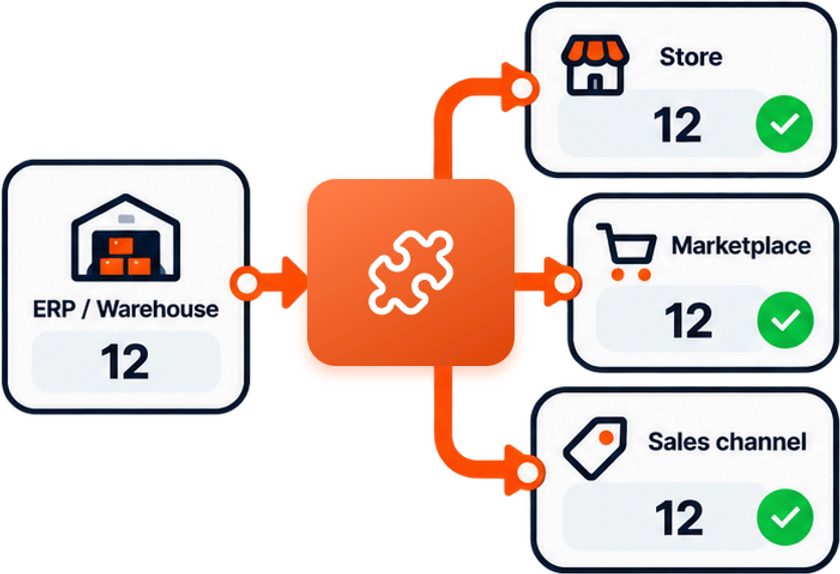
The ERP with 12 in stock, linked through the orange piece to the store, the marketplace and another sales channel: all of them show 12, with a green tick.
The ERP leads: 12 in the warehouse, 12 on every channel.
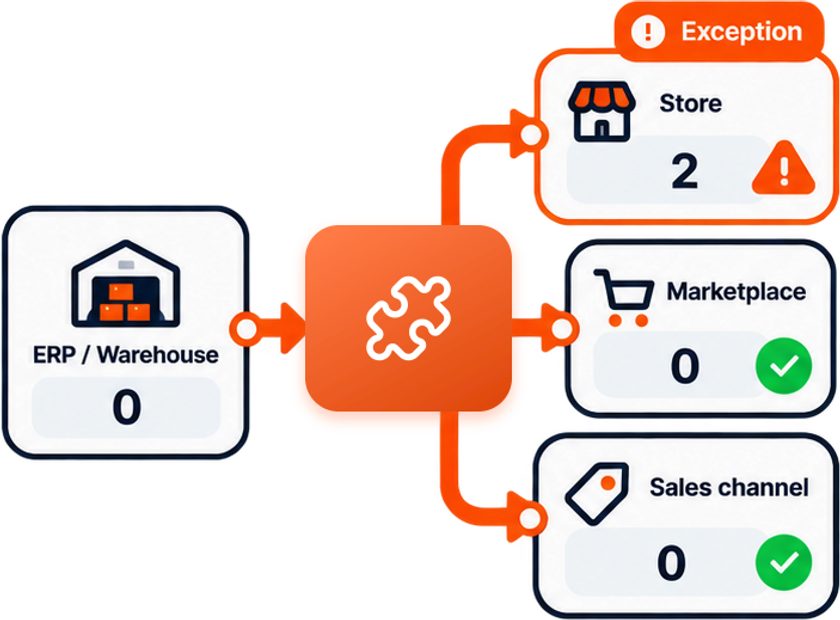
The ERP at zero: the marketplace and the other channel show zero, the store still shows 2 and is flagged as an exception.
The warehouse drops to zero and the channels follow. The store still showing 2 becomes an exception and goes to a person.

Where stock breaks

Six reasons why website and warehouse show different numbers.

It is almost never WooCommerce’s fault. It is the path the data takes between warehouse, ERP and sales channels that has a hole in it.

One item’s recordPick an item

Nobody decides who leads

If both the ERP and the website can change stock, sooner or later one overwrites the other. You need one source that leads and the others that follow.

For exampleThe warehouse books in 20 pieces at 10:00, the website sells 3 at 10:05, at 10:30 an old update arrives: the website goes back to 20 instead of 17.

Six questions to answer before connecting anything. The answers become the rules of the connection.

The stock check

Every item compared across warehouse, website and marketplace.

One source leads, the others follow. When a number does not match, the software flags it with the reason instead of silently overwriting it.

ItemWarehouseWebsiteAmazonResult
TS-BLK-M black shirt M121212 In sync
TS-BLK-L black shirt L020 The website sells 2 pieces that are not there
KIT-003 set of 34 kits possible104 The website ignores the parts
TS-WHT-S white shirt S757 Website 2 pieces behind
CAP-RED red cap322 In sync, safety stock of 1

Real case in production

An online store with several suppliers and stock that never matched.

Every delivery meant hours of manual updates. Now the barcode is read, matched against the catalogue and stock updates on its own.

An online store received goods from several suppliers, each with its own formats and codes, and every delivery meant hours of manual updates. The system reads the barcodes from the documents, matches them against the catalogue, updates availability and flags the exceptions. Different formats are normalised automatically.

  • Barcodes
  • Multiple suppliers
  • Runs locally, no subscription
Before After
Hours to update stock after every delivery A few minutes, barcode read and stock updated
Different codes for every supplier, frequent errors Zero stock errors since going live
Out of stock products still for sale online The team only handles the exceptions

Do you have a similar case?

Plugin or custom solution

A plugin updates stock. A custom solution updates your stock.

Plugins work when everything is standard. With several suppliers, different codes and rules of your own, you need something that knows them.

Generic plugin

  • Designed for the most common case
  • Does not know your suppliers’ codes
  • Stops when a format changes
  • Exceptions are still handled by hand

Solution built for you

  • One reliable source that updates the others
  • Mapping between internal, supplier and website codes
  • Different formats normalised automatically
  • Exceptions are flagged, not hidden

The data stays in the company

Stock levels and suppliers are valuable information.

Quantities, suppliers, purchase prices. The solution can run locally, with no mandatory cloud and no subscription.

  • Runs on your networkIn the real case the system runs locally, with no cloud and no subscription.
  • New supplier, no rebuildA new file format is added to the configuration.
  • Only exceptions reach a personThe team steps in when a figure does not match, not at every delivery.

Before you write to us

It is not the right fit for everyone.

It makes sense if

  • You have several suppliers with different files and codes
  • Stock is updated by hand or late
  • You sell on several channels from the same warehouse
  • You sometimes sell products that are sold out

You do not need it if

  • You have one supplier and a plugin already works
  • Stock rarely changes
  • You are looking for a new turnkey online store

Tell us about your case

What clients say

Verified clientB2B client
You explained exactly how you would approach the problem. That gave me the confidence to choose you.
Supplier selection for a software project (extract)

Verified review, anonymised for privacy.

Frequently asked

Questions on this topic.

Which program should lead on stock levels?

Usually the one where goods really come in and go out, the ERP or the warehouse program. Website and marketplaces follow. It is decided during analysis, item by item if needed.

Do I need to change my ERP or WooCommerce theme?

No. The connection starts from how data leaves your ERP today: API, export, database or files. The store stays as it is.

How often does stock update?

It depends on the ERP and the volume. It can update at regular intervals or on every change, decided together based on what you actually need.

What happens on peak days?

The time between a sale and the update of the other channels gets shorter and, where it helps, a small safety stock is kept on the best selling products.

Does it handle variants and bundles?

Yes, as long as the rules are clear. Variants, kits and alternative codes are mapped during analysis and tested on real data.

Can barcodes be used?

Yes. In the real case the barcodes on supplier documents are read and matched against the catalogue, so stock updates without anyone copying quantities.

What about other ecommerce platforms or marketplaces?

Yes. The same approach works for Shopify and for platforms that let you update quantities from outside, with APIs or import files.

Start with the problem

Tell us where your stock breaks.

Which ERP you use, how many suppliers you have, how their files arrive and what happens today when stock does not match.

  • The first check is free and commits you to nothing
  • Every message gets read, there is no call centre
  • Fixed price and payment by milestone
  • Italian and English, VAT invoices
  • No phone call unless you want one
  • If nothing should be built, we will say so

Prefer to write directly? [email protected]

No newsletter, no unsolicited calls. A direct reply from the developer, within one working day.