

15 hours
a month retyping
300 invoices at 3 minutes each, before any checking.
Automated checks
Connections between programs
Custom management systems
The method
Technology
Technology: OCR and data extraction
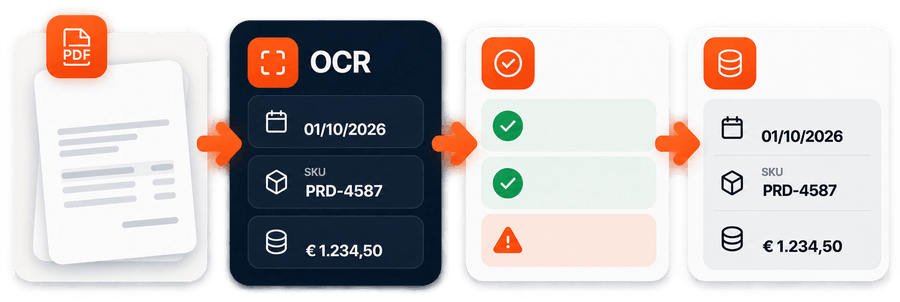
Invoices, delivery notes and shipping statements arrive as PDFs, sometimes scanned. Someone opens them again and retypes the data. The software reads them, extracts the fields you need and checks them before they are used.
“He understood the assignment, he asked good relevant questions and delivered excellent work that did not need correcting.” Verified client, data extraction from PDFs
At a glance
How it works
The problem
A supplier sends the invoice as a PDF, the courier sends the shipping statement, the warehouse receives the delivery note. The figures are all there, but to use them someone has to retype them: into a spreadsheet, into the ERP, into a check.
With a few documents it is manageable. With hundreds a month it becomes a full-time job, and every manual copy brings a few mistakes with it.
In detail
There is no single OCR that fits everything. The first step is knowing which document you are looking at.
Structured e-invoice, PDF with text inside, or a scan: three different cases, three different paths. In a structured e-invoice the data is already in fields and OCR is not needed.
In a PDF with text the data is read directly; only scans need OCR. Then the fields are extracted, with one template per supplier or courier.
Lines must add up to the total, tax must match, codes must exist. Whatever does not add up does not pass: it goes to a person.
The data goes where it is needed: the ERP, a spreadsheet, a comparison with order or contract.
When it pays off
It makes sense if
You do not need it if
An example with numbers
Reference figures, to redo with your own.
15 hours
a month retyping
300 invoices at 3 minutes each, before any checking.
30 invoices
to look at, afterwards
If one in ten has something that does not add up, the person opens only those.
8 lines
wrong out of 400
An OCR that is 98% right still gets 8 lines out of 400 wrong. That is why every line is checked.
We already do it. In the shipping statements project the program reads the PDFs of several couriers, each with its own template, hundreds of lines per invoice, and recalculates every shipment against the contract. Read the full case
The limits
A 1 read as a 7, a 0 as an 8. That is why numbers are checked against totals, never taken on trust.
A new supplier or a changed layout has to be added. We plan for it at the start instead of finding out later.
It reads “10% discount”, but whether that discount was due is in the contract, not the document.
When a value fails the checks, the system flags it instead of guessing.
Frequently asked
No. An XML e-invoice, like the Italian SdI format or a Peppol UBL invoice, already has its data in structured fields: it is read directly, with no OCR. OCR is for scanned PDFs and documents that arrive only as images.
On a PDF with text inside, reading is exact. On scans it depends on quality: that is why every extracted value goes through checks on totals and codes, and whatever does not add up goes to a person.
Not necessarily. The software can run on your own servers without sending documents to outside services.
Not always. For recurring layouts, templates and rules are enough. AI helps when layouts change often, but the result still has to be checked.
Usually from a few hundred a month. Sooner, if the data then has to be compared with orders, price lists or contracts.
Start with the problem
An invoice, a delivery note or a shipping statement: we will tell you whether it can be read automatically, and how.
Prefer to write directly? [email protected]