

Projects
The Order Is Already in the Email. Why Enter It Again?
I built Inbox to Order to turn order emails and PDFs into proposals reviewed by a person, with AI interpretation and software checks before ERP entry.
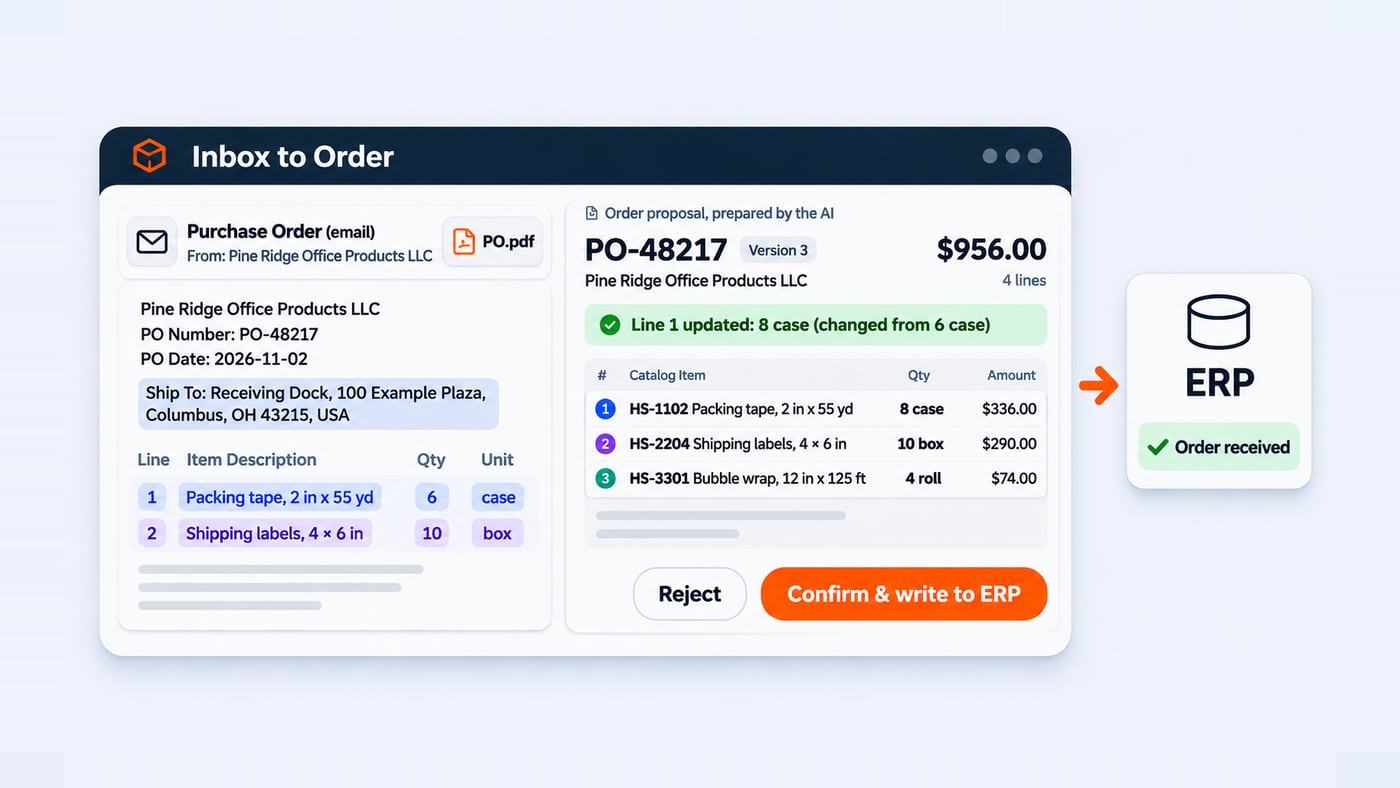
A customer sends an order by email. The products and quantities are already in the message, perhaps in an attached PDF. Yet someone still has to read it, find the matching items in the catalogue and type everything into the ERP. Then comes a reply: “Make it eight cases instead of six. Everything else stays the same.” Now someone needs to find the right order, change the right line and avoid creating a duplicate.
That handoff is what I wanted to explore with Inbox to Order. It is a personal experiment: nobody commissioned it and I am not selling it. I wanted to connect a mailbox to an order system and let AI read the messages. The final decision stays with a person.
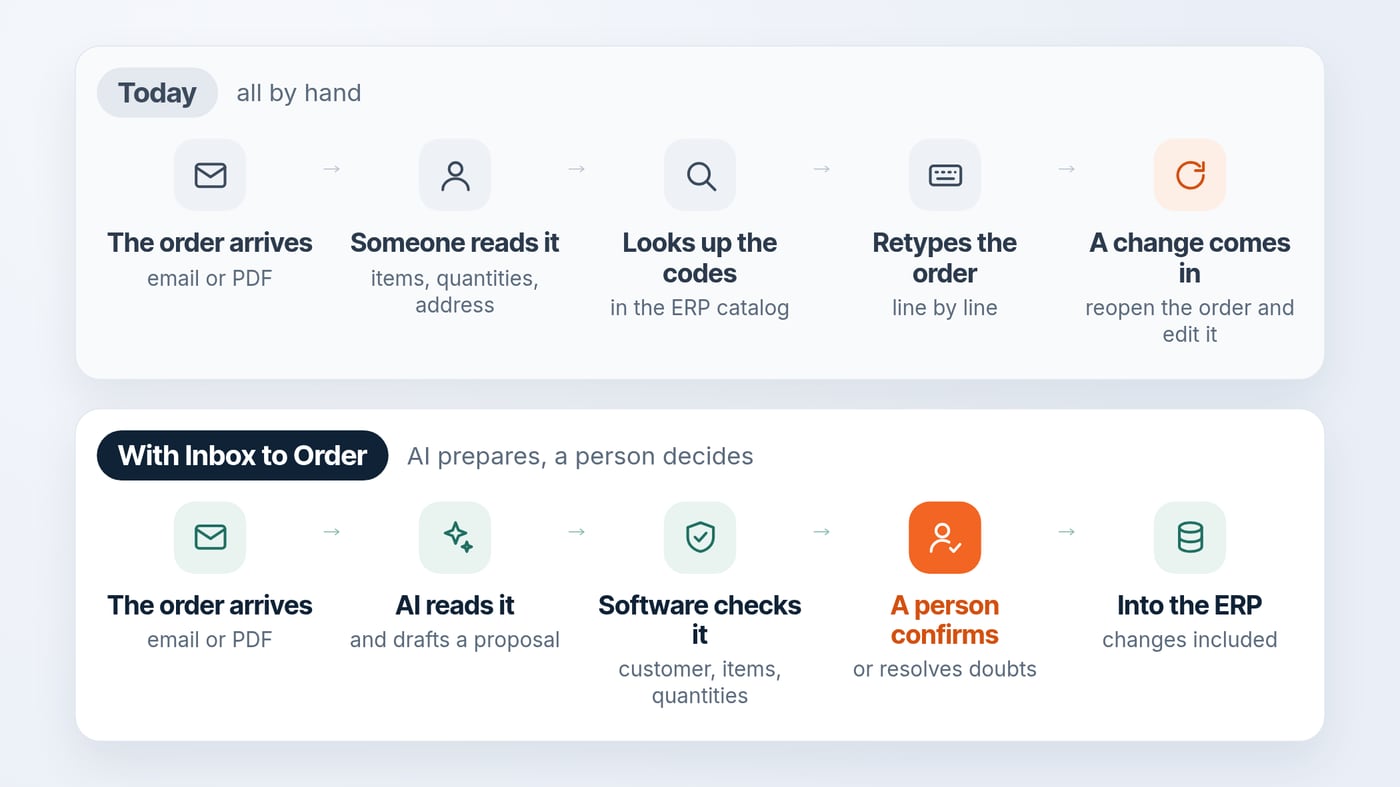
From emailed orders to a proposal a person checks
I built a small application that reads email conversations, identifies which ones concern orders and prepares proposals for review. The model can also read text from attached PDFs. It looks for the customer, items, quantities and changes made later in the conversation. At that point, though, the application has written nothing to the ERP.
The board groups conversations by status: new, needs a person, ready to confirm, already written or set aside. An operator can open a proposal, see which words support each value, make corrections, and confirm or reject it. The application writes the order to the ERP only when the operator confirms.
In the video below I follow that path on a Gmail test account using Claude. The messages, customers and orders are fictional, as is the ERP; the application and mailbox calls shown are from the actual test.
A board that makes the exceptions visible
I did not want to build another inbox in which every message looks equally important. So the status columns show at a glance which conversations can move forward and which ones need attention. A message that is not an order also gets a visible outcome, rather than simply disappearing from the process.
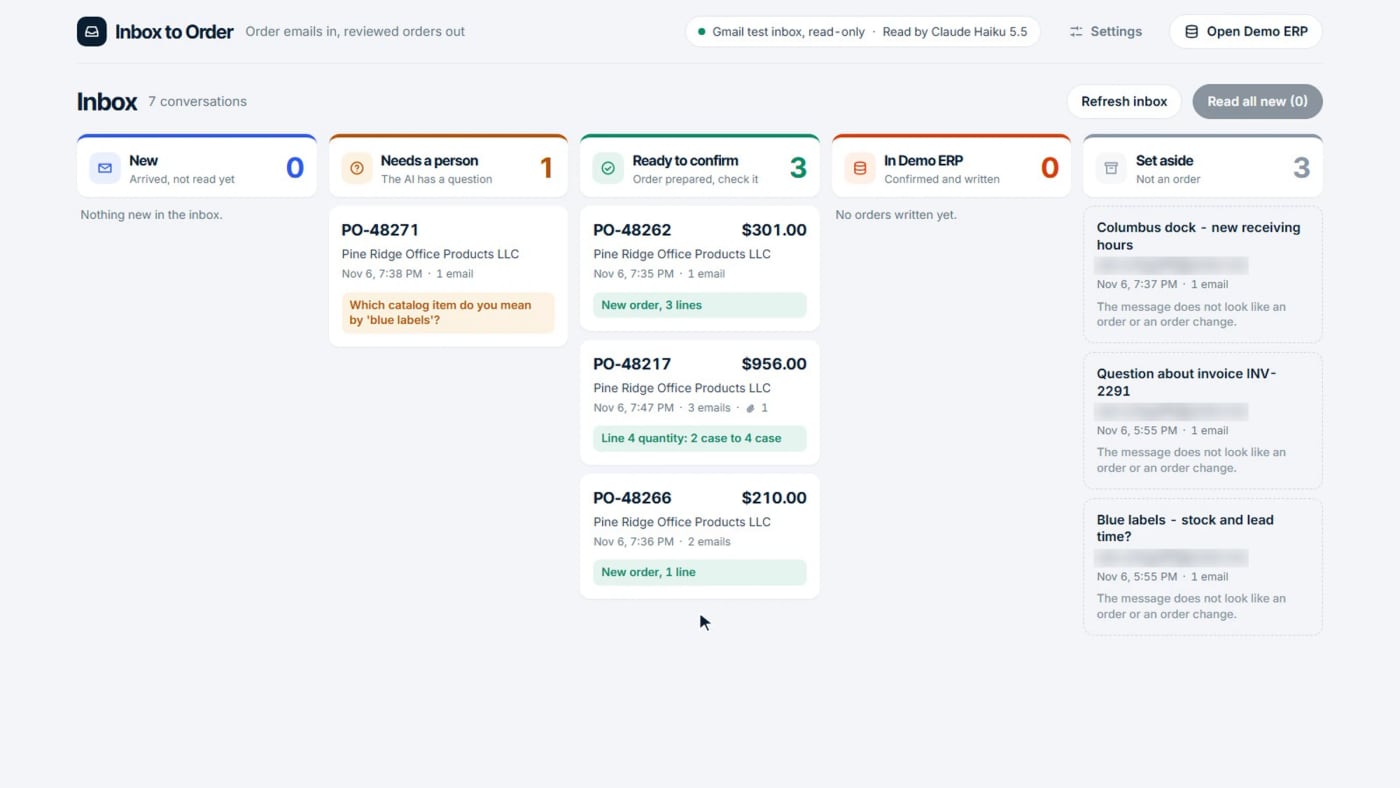
Whoever handles the orders can see which emails the application has already read. They can also see which ones wait for a reply, and why a conversation was set aside.
A PDF, two changes and a trail back to the source
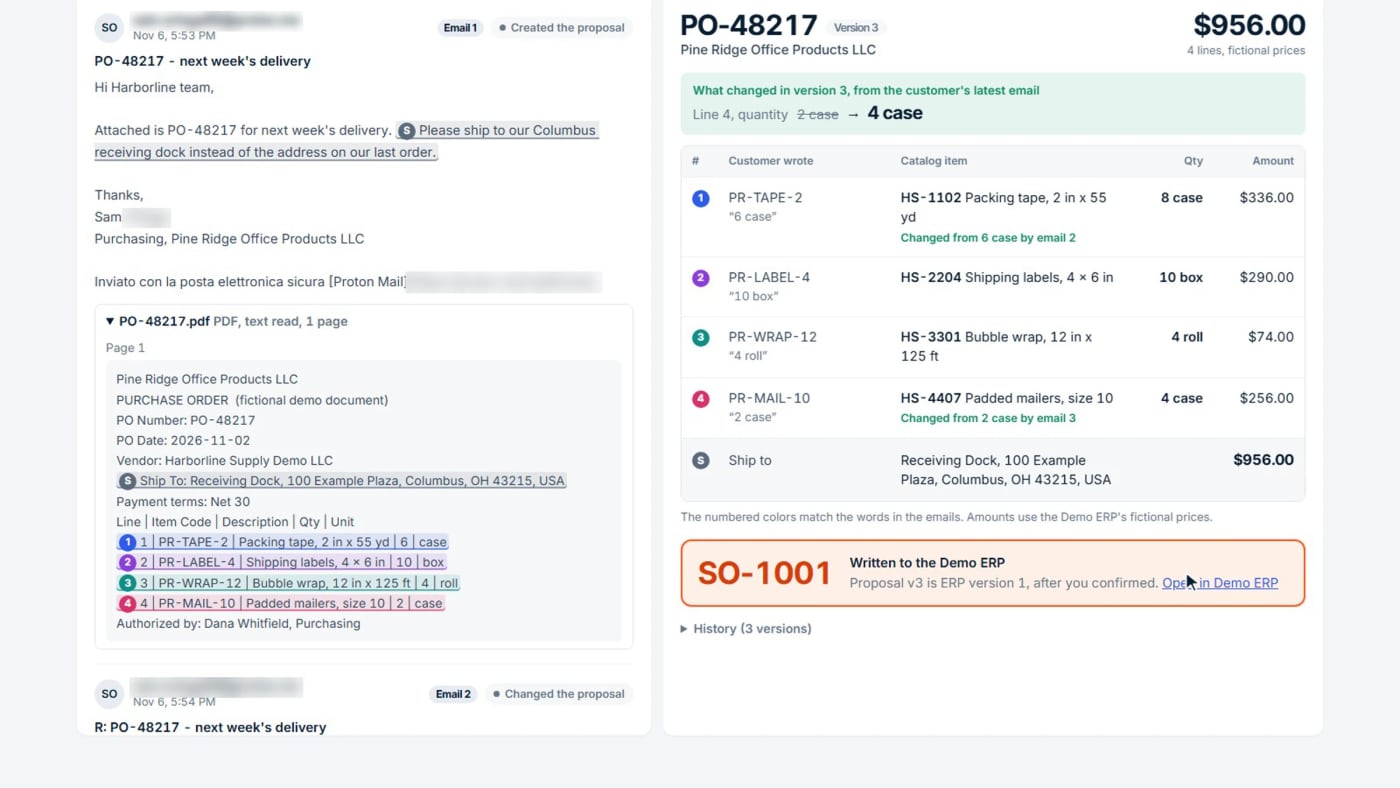
The most complete case in the test starts with an attached purchase-order PDF. It contains four items: packing tape, shipping labels, bubble wrap and padded mailers. Then two replies change the quantities of two items. Both are amendments to the original purchase order, and the software has to treat them that way.
The proposal displays the document reference, the extracted lines and the changes applied in sequence. Each value links back to the relevant words in the email or PDF. I cared about this: when a product or quantity looks wrong, the operator sees the sentence it came from and can check it.
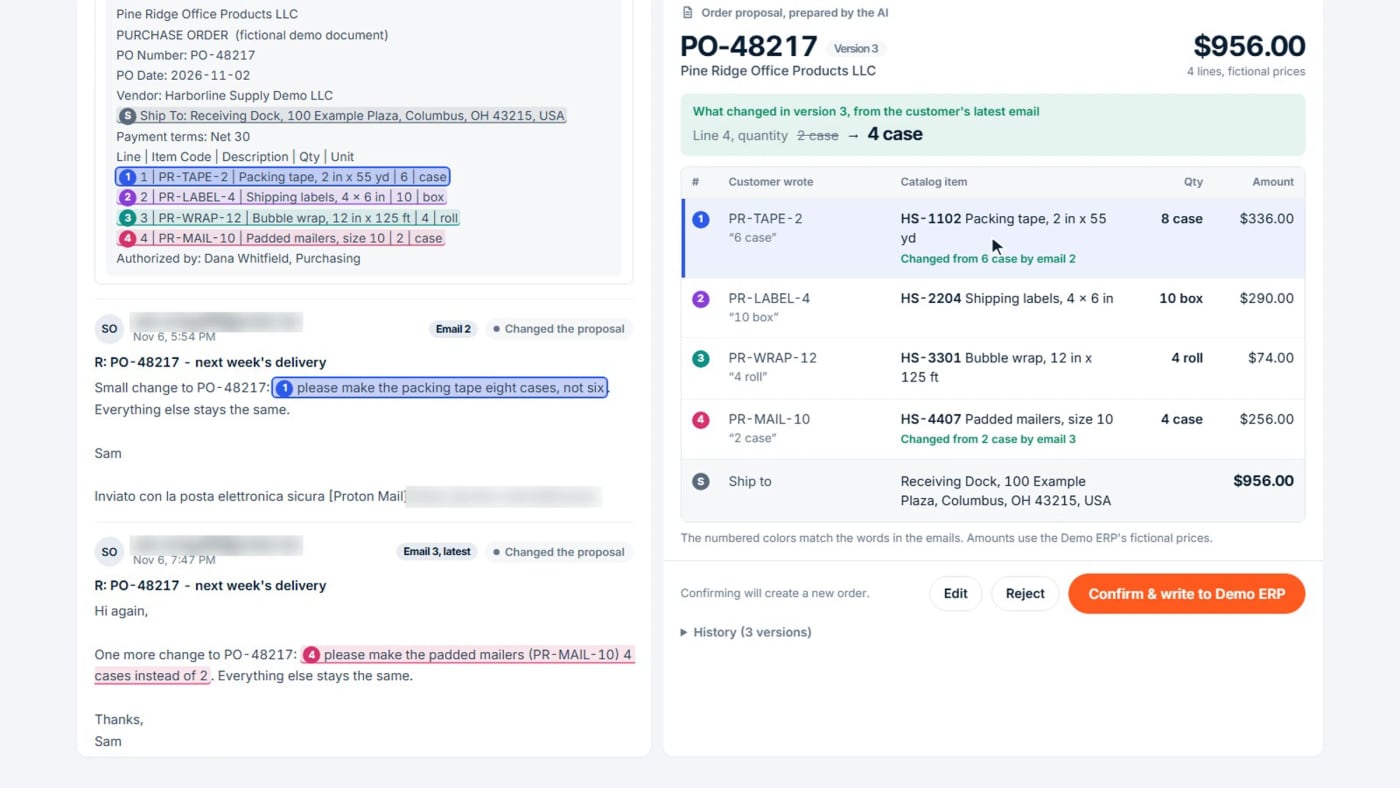
Changes also introduce versioning problems. The application needs to know whether it is creating a new order, updating a pending proposal or amending something that already exists in the ERP. It keeps a history, detects previously processed messages and checks that the operator confirms the same version they actually reviewed.
The most useful decision was not to guess
For example, I included a deliberately ambiguous email requesting twelve “blue labels”, with no clear product or unit. More than one catalogue item could fit. A system focused only on completing the task might choose the first plausible match.
Mine does not. It shows the alternatives, keeps the proposal waiting and asks a person to settle the ambiguity. The same principle applies if the sender does not map to a known customer. It also applies when the source text does not back up a value.
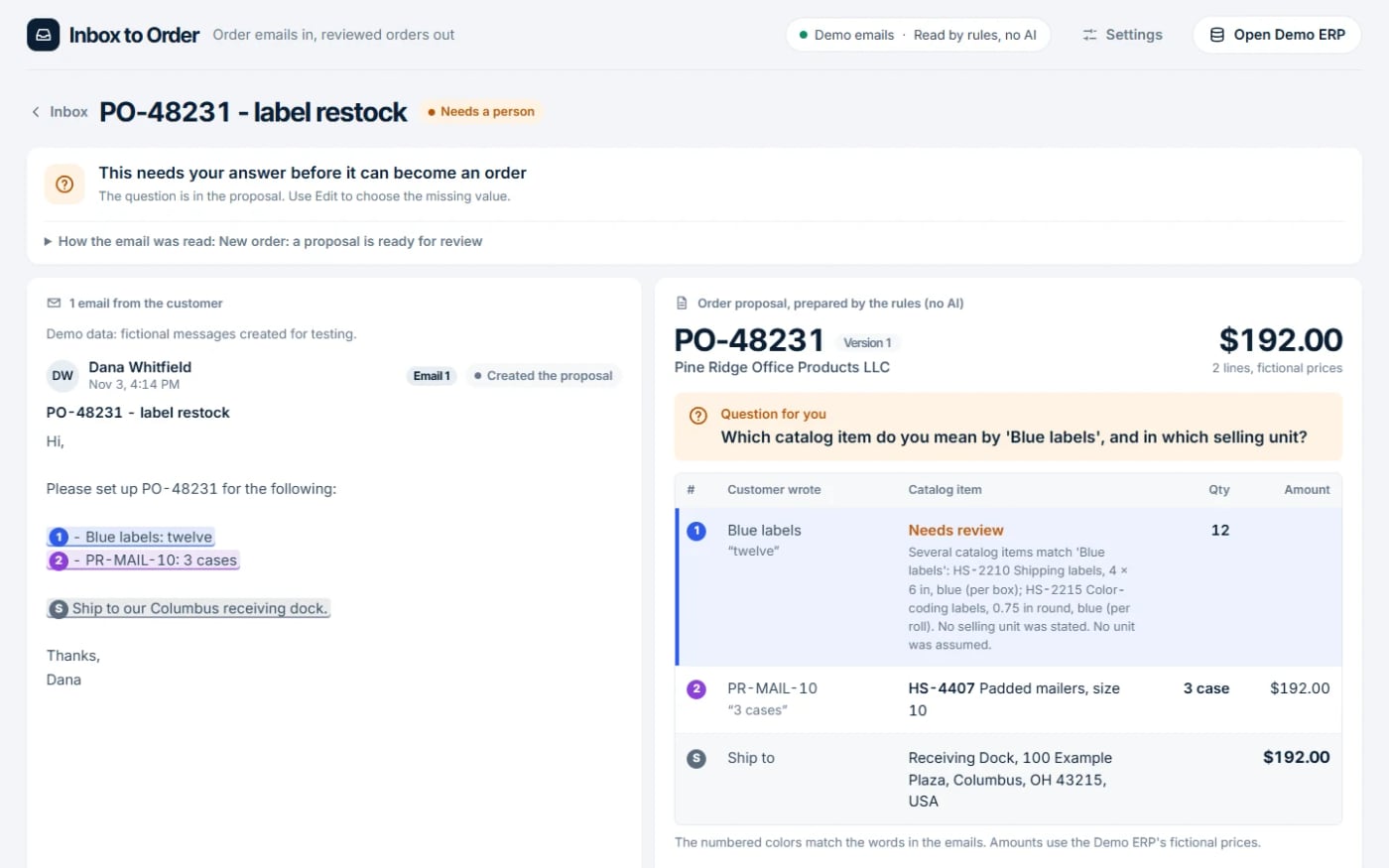
This is probably the part of the experiment that says the most about how I approach integration. A person steps in where a decision really needs judgement, as it does here.
Giving the AI a narrow job, with clear boundaries
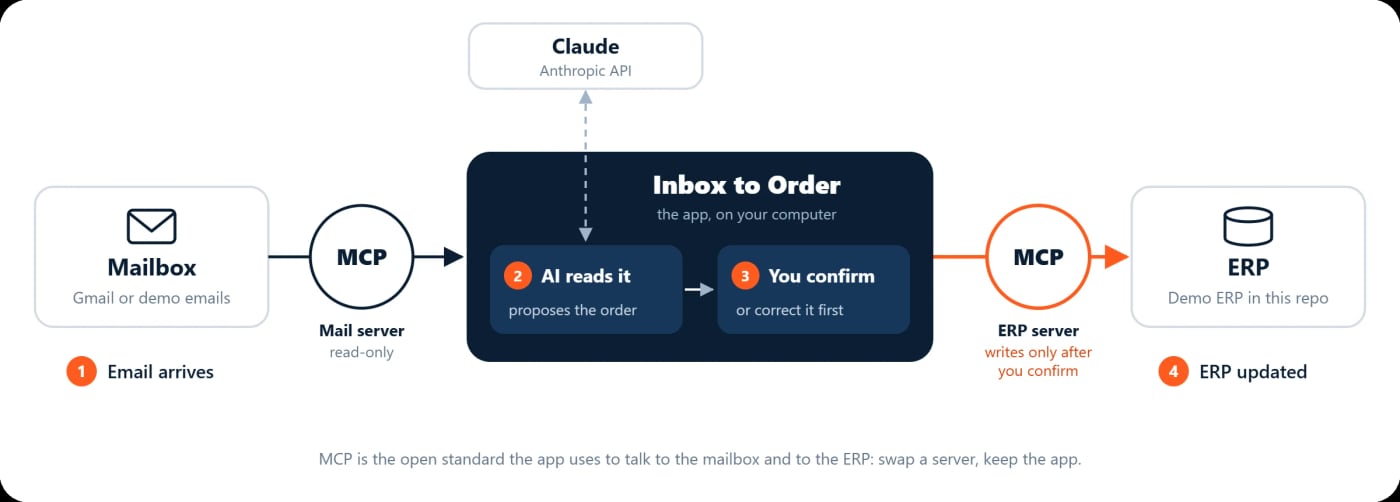
I used MCP, Model Context Protocol, an open standard for exposing external tools to AI applications. In practice there are two separate connections here. One reads the mailbox and PDF text. The other connects to the Demo ERP and its customers, catalogue and orders. I have also written about MCP and AI assistants on Levixflow; the official MCP documentation (opens in a new tab) explains the standard itself.
I was just as careful about what the model cannot use. Claude gets only read-only tools, scoped to the selected conversation and the data it needs. It has no tool that can create or update an ERP order. Then traditional code checks the proposed customer, item, selling unit, quantity, address and order reference. The Demo ERP validates the write again after the human confirmation.
I also included messages with text that looks like instructions to the AI. The application treats those passages as part of the message and never runs them. When it spots suspicious wording it shows it to the operator, but that is not the main protection. The real safeguards are the read-only tools, the checks in the code and the confirmation of a person.
Restricting permissions also had a practical consequence: emails read by the application remained marked as unread in Gmail. Changing that status would have required broader permissions that the experiment did not need. I also filtered out a Google security notification that appeared in the test inbox. There was no reason to send it to the model.
I follow the same principle with APIs, webhooks and connectors: for every connection I decide which values to accept and which actions to allow.
What the test showed, and its limits
The application read and sorted ten emails across seven conversations in a Gmail test inbox, including a text-based PDF. On my Windows 11 machine it took 19.4 seconds, with up to four conversations processed at the same time. The outcome was three proposals ready to confirm, one requiring a person and three conversations set aside. In a separate run, Claude passed 60 out of 60 checks on the eight bundled demo emails.
These are measurements on emails written for the test. They say nothing about accuracy on real customer emails, and they are no promise of performance. The project does not use OCR for scanned PDFs and does not handle quotes or invoices. I have not connected it to a commercial ERP either. With Claude enabled, the application sends the selected email content to the AI service. In a real business, however, that choice needs careful thought.
The Demo ERP, a fictional order system
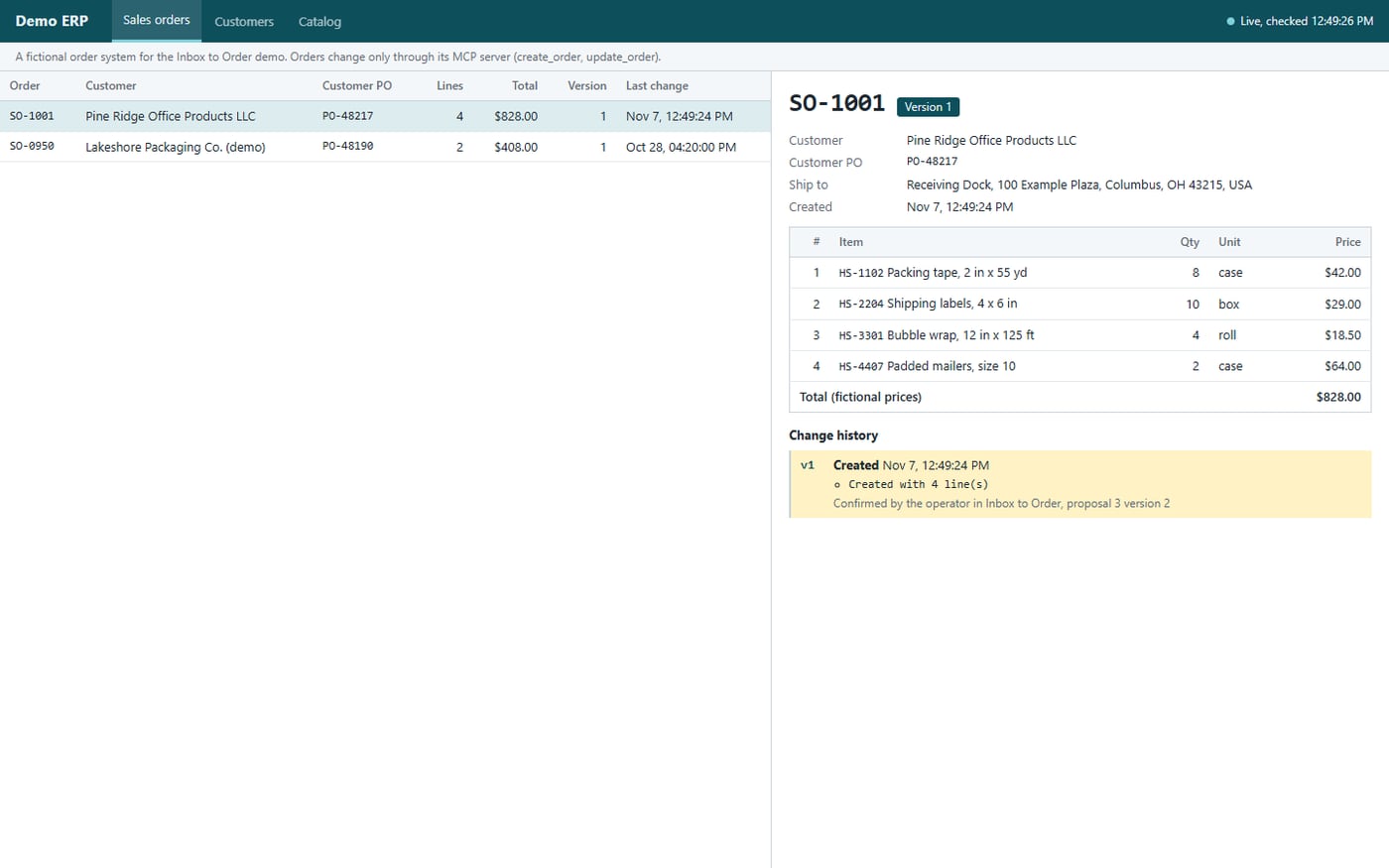
The Demo ERP is the fictional order system I built for the test. It is a small SQLite database with its own MCP server in front of it, standing in for another company’s ERP. It holds two customers, a seven-item catalogue, the customers’ own item codes and one existing order (SO-0950). That order is there to test changes to an order already in the system.
The Demo ERP has its own window, which shows orders, customers and catalogue without being able to change them. Orders change only through the MCP server, and only after the confirmation in the application. Before it writes an order, the Demo ERP checks customer, delivery address, item, selling unit and quantity again. It also refuses an order number that the same customer has already used. If the same confirmation arrives twice, it does not create a second order. Connecting a real ERP means writing another server in place of this one, with that system’s rules. The rest of the application stays the same.
The source code, setup instructions, automated tests and documented limitations are available in the Inbox to Order GitHub repository (opens in a new tab).
What reading email orders costs, and the time it can save
In the test I used Claude Haiku 5.5, the lowest-cost Claude model. The application records the tokens of every call and prices them at list price. These are estimates, but they show the order of magnitude.
| What I measured | Result in the test |
|---|---|
| AI cost per email | about $0.001 to $0.002 |
| AI cost per 1,000 emails | about $1 to $2 |
| Reading time per email | 2.5 to 7.3 seconds |
| Ten emails in seven conversations | 19.4 seconds |
| Checks passed on the eight demo emails | 60 of 60 |
So the AI cost is close to negligible. The real comparison is with people’s time. I did not measure how long it takes to enter an order by hand, because that depends on the ERP and on the orders. As a reference I use 3 to 5 minutes for an order of a few lines. For checking and confirming a ready proposal, I estimate under a minute.
With these numbers the calculation is simple. A company that receives 30 orders a day by email spends about two hours retyping them. With a proposal to check, that drops to around 30 minutes. The AI for those 30 orders would cost a few cents a day. To run the numbers for your company, multiply your daily orders by the minutes they take today.
What it would take to connect a real ERP
In a real project, the main cost sits in the connection to the ERP. The prototype works with the Demo ERP because I wrote its codes and rules myself. A real system has its own customer codes, item codes, units of measure, price lists and checks. Connecting it means writing a new MCP server that translates between those rules and the application. MCP keeps that work tidy and in one place, but someone still has to do it.
Before daily use, a company would also need:
- a test on real, anonymised emails, to measure accuracy before writing any order;
- a first period in read-only mode, or on a test company in the ERP;
- OCR, if customers send scanned PDFs;
- separate logins and permissions, to decide who can confirm;
- a clear choice about where the model runs, because the email text goes to the AI service.
These steps decide the time and cost of a project far more than the model calls do.
When it pays off, and when it does not
After this test, my view is this. A system like this pays off when orders arrive as free text or PDFs, from many different customers, and someone spends hours each day retyping them. It also helps when changes by email are frequent, because that is where duplicates and errors start.
It pays off less when there are only a few orders a day. The same goes for customers who already use a portal, a B2B shop or EDI. In those cases the data already arrives structured, and a traditional connector is usually enough.
For me the main lesson is about where to put the work. In the test the AI read the emails correctly and cost very little. What makes the system reliable is the code checks, the version handling and a person’s confirmation. If I took this into a company, I would spend most of the time on those parts rather than on choosing the model.
If orders reach your company this way, the page Email orders into the ERP explains how to start: a free check, then a trial on your own emails.
The missing piece between the programs
This experiment shows something smaller than orders that enter the ERP by themselves. The model interprets the message, the code checks that the data makes sense and a person decides whether to confirm. They are three different jobs, and it pays to keep them apart.
That is close to the work I do through Levixflow. Before replacing a business system, I would rather see where people still carry information by hand between tools that already exist. I have also written about when to choose a new ERP or better integration. Inbox to Order began that way: I took one of those handoffs, the emailed order, and tried to connect it. Where a decision still needs a person, the application makes that visible.
Frequently asked questions
Practical FAQ
Does Inbox to Order automatically write AI-generated orders to an ERP?
No. The application proposes an order, and the Demo ERP is written to only after an operator confirms the proposal and the software checks it.
Is Inbox to Order connected to a production ERP?
No. It uses a fictional Demo ERP and fictional test data. Integrating a commercial ERP would require a connector and mappings for its customers, products, units and rules.
Can it read PDF purchase orders?
It can read PDFs containing selectable text, as demonstrated in the Gmail test. Scanned PDFs are not processed with OCR; they are flagged for review.
What happens when an item or order change is ambiguous?
The application asks for human clarification rather than guessing. Later emails can update an existing proposal, with version checks before the operator approves an ERP write.
How much does it cost to have AI read email orders?
In the test, with Claude Haiku 5.5, about $0.001 to $0.002 per email at list price, or $1 to $2 per thousand emails. In a real project the main cost is connecting the ERP, not the model.